Guide / Translation workflow
Detection
Detects speech balloons, sound effects, and background text
Choose the source language
Set the source language to recognize.
Set the detection threshold
The threshold defaults to 60%, with 50–70% recommended. Lower values detect more loosely and may pick up areas you don't want; higher values only catch what's unambiguous. Pushing it too high can miss faint text or small sound effects, so stay near the default.
Balloon extraction and background restore
Extract balloons recognizes balloon shapes and creates balloon layers with the text removed. Restore background fills in the empty area left behind naturally.
When you can turn both off
A PSD with separated balloons is one where each balloon sits on its own layer and can move freely over the background. In that case you can turn off both Extract balloons and Restore background.
Start detection
When you're done, click Start detection. Detected areas appear on the canvas color-coded as balloons, sound effects, and background text, and a Detection Result folder is added to the Layers panel. Anything missed can be added by hand in the next step, Recognition.
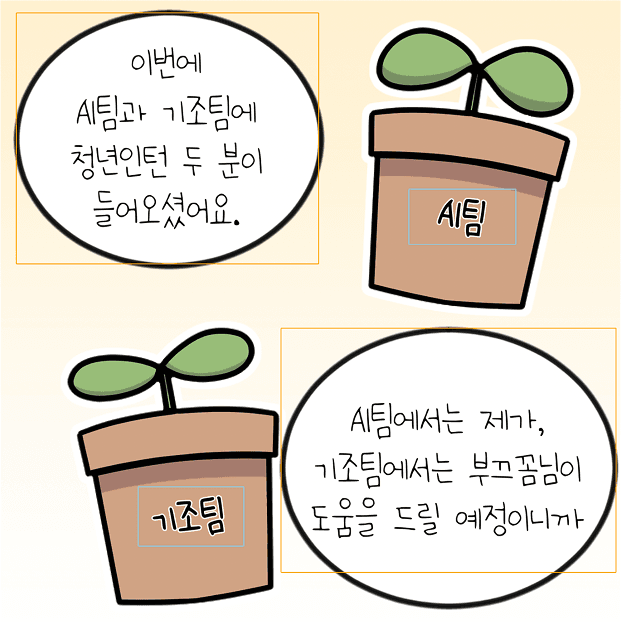
Canvas after detection
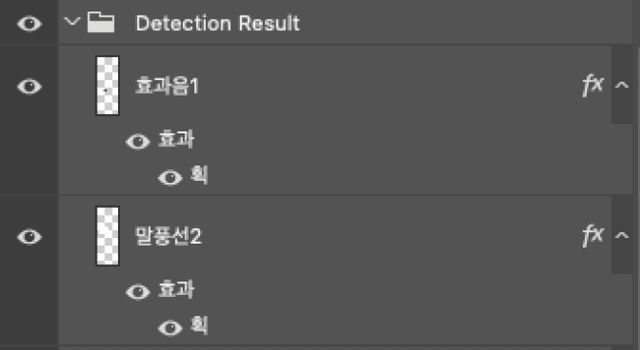
Layers panel after detection