All four webtoon translation steps,
automated inside Photoshop
From balloon detection to text recognition, translation, and image compositing —
cut manual typesetting from hours per episode down to minutes.
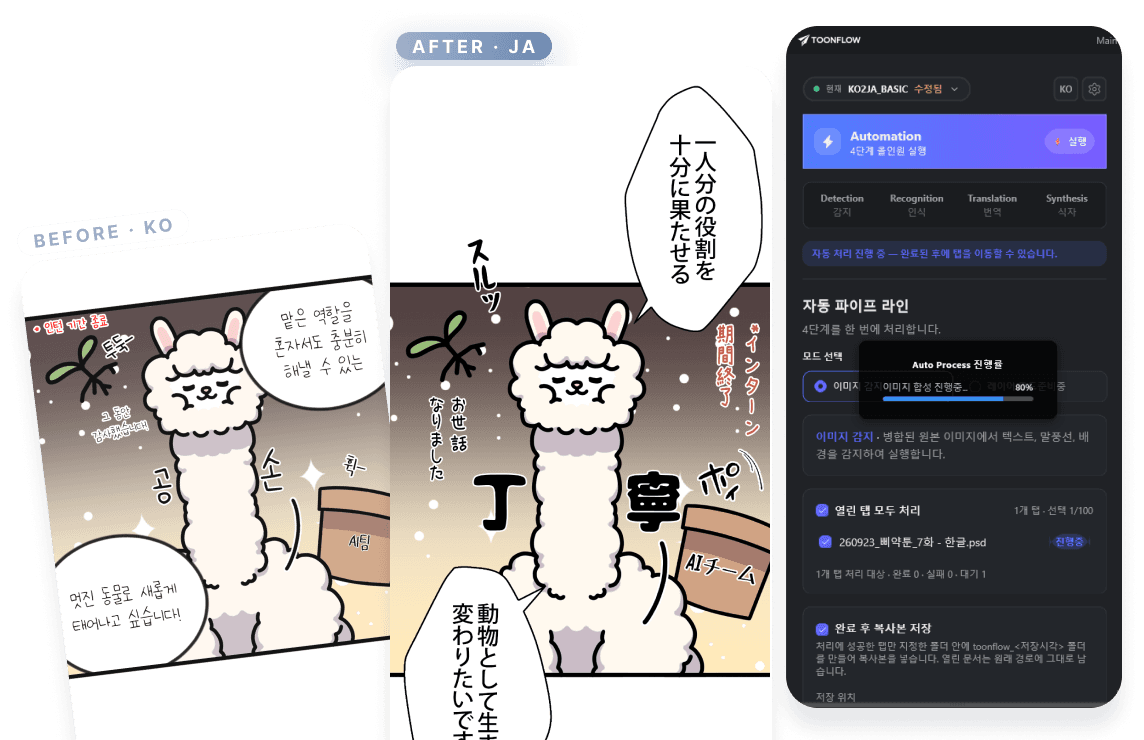
PIPELINE
Four steps, one flow
Detection
Automatically detects speech balloons and text areas, then splits them panel by panel.
Recognition
Reads source text accurately, including vertical Japanese writing (縦書き).
Translation
Translates in context, applying your team's guidelines and glossary.
Typesetting
Auto-matches fonts, composites them as layers, and compares against the original instantly.
F E A T U R E S
Built for studio workflows
From solo translators to localization teams of dozens — everyone works in the same pipeline.
Automatic font matching
Font recognition keeps typesetting consistent
Presets
Save per-title settings and switch with one click
Autopilot
Runs all four steps in order — detect, recognize, translate, typeset — without switching tabs
Source · translation compare
Review before and after side by side in the panel
Glossary integration
Translates against your glossary for consistent, accurate results
Three languages
KO · JP · EN — the major webtoon markets
Pricing
See details →Free
Free
3,500 credits
Creator
₩29,900/mo
4,980 credits / month
Pro
₩99,900/mo
16,500 credits / month
Studio
₩249,900/mo
41,500 credits / month
Automate it from the next episode
Create an account and process your first episode free.
Continue with GoogleTOGETHER WITH TOONSPACE
The plugin for precision work, the web for the full pipeline
The Toonflow plugin and ToonSpace share one account and one credit balance. Use the plugin for detailed work in Photoshop,
and the web for pipelines, review, and teamwork — mix them however your team works.